3.1 KiB
| uid |
|---|
| arfoundation-ar-camera-background-with-scriptable-render-pipeline |
Configuring the AR Camera background using a Scriptable Render Pipeline
AR Foundation supports the Universal Render Pipeline (URP) versions 7.0.0 or later. See the URP Install and Configure documentation for more details on switching to URP.
[!NOTE] Projects made using URP are not compatible with the High Definition Render Pipeline or the built-in Unity rendering pipeline. Before you start development, you must decide which render pipeline to use in your project.
Basic URP configuration for AR Foundation
Set up URP Render Pipeline asset
[!NOTE] The following basic steps for URP setup are not specific to AR Foundation and are included to indicate how to convert a legacy AR Foundation project into a URP AR Foundation project. If your project was created from the URP Project Template or you already have a
UniversalRenderPipelineAssetandPipeline Asset (Forward Renderer)in your project, skip to the next section.
To use the Universal Rendering Pipeline, you must create a Pipeline Asset. Follow these steps:
- In the project's
Assetsfolder, create a new folder namedRendering. - In the
Renderingfolder, create a Pipeline Asset (Forward Renderer) for URP: Right-click anywhere in the folder and select Create > Rendering > Universal Render Pipeline > Pipeline Asset (Forward Renderer) from the context menu. This creates two assets:
Configuring URP to work with ARFoundation
After you created a Pipeline Asset, you can configure the asset to work with AR Foundation. Follow these steps:
- Locate your
Forward Rendererasset. If you created your project from the URP Project Template, this is located in theSettingsfolder in your project'sAssetsfolder. - Select your
Forward Rendererasset. In its Inspector, add anARBackgroundRendererFeatureto the list of Renderer Features.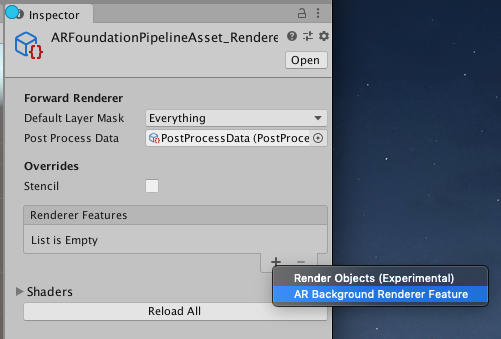
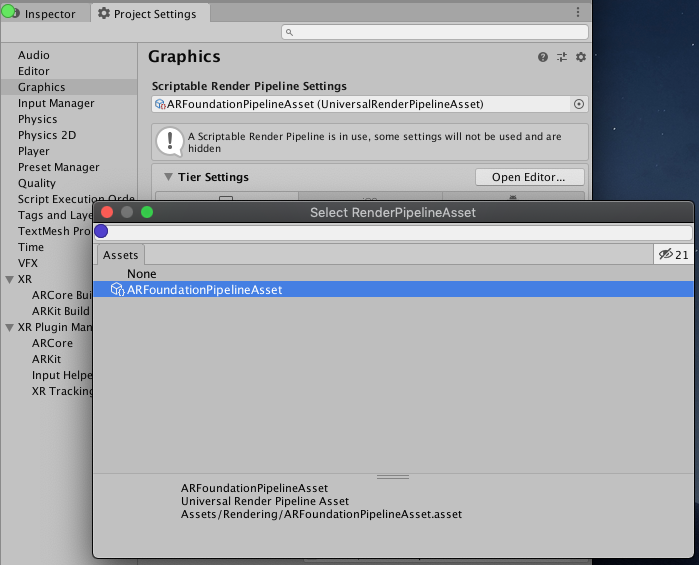
- Access the Graphics section of the Project Settings window (menu: Edit > Project Settings, then select Graphics), and select the
UniversalRenderPipelineAssetin the Scriptable Render Pipeline Settings field.